

Smart Classroom vs Hybrid Classroom: Key Differences
- August 3, 2026
- Posted by: Meet Shah
- Categories: Blogs, Edtech
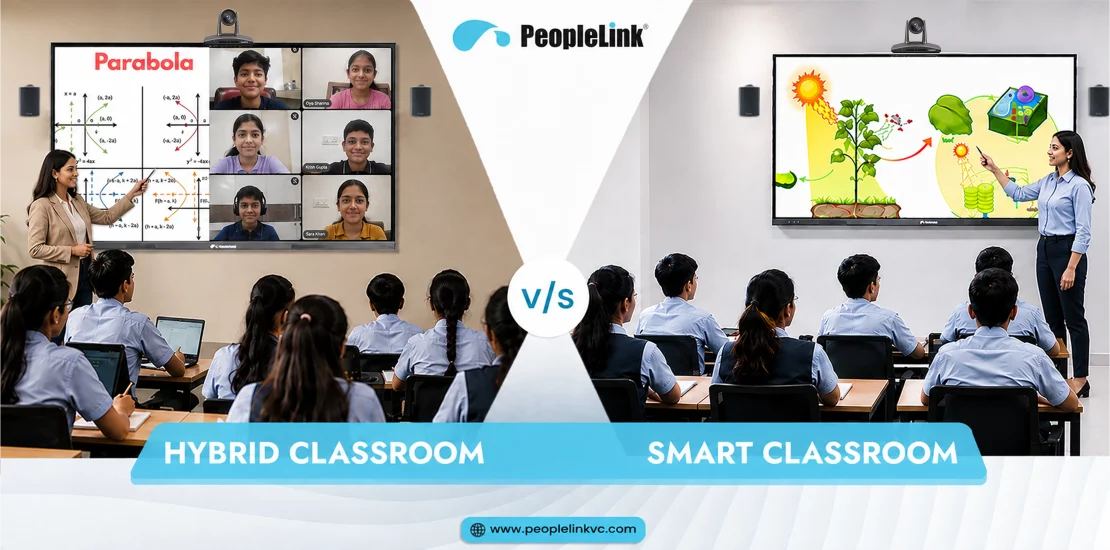
Over the last decade, education has changed dramatically. The traditional type of learning environment which previously consisted of chalkboards, handouts on paper and fixed wooden desks has now quickly become a type of learning setting enabled by technology. Nowadays, students do not just passively absorb lectures; they engage with interactive material, collaborate on digital canvases and have access to learning resources both across physical and virtual boundaries.
When educational institutions such as universities, coaching centres, and corporate learning teams are modernising their system, Decision-makers usually choose between two learning models: the smart classroom and the hybrid classroom.
Even though these terms are frequently used as if they were the same in ordinary conversation, they actually describe completely different learning environments, technical structures, and learning goals. There can be problems such as buying the wrong equipment, making poor use of the budget, and causing day-to-day frustration for teachers if a smart classroom is confused with a hybrid classroom.
If you want to select the appropriate digital setup for your school, college, corporate training facility, or government education project then understanding these main differences will be helpful.
What is a Smart Classroom?
A smart classroom is a technology-enabled classroom which makes use of modern digital technologies in order to improve face-to-face teaching. In such a smart classroom arrangement, both students and teachers are actually present in the same room.
The main aim of a smart classroom is to substitute static teaching materials such as blackboards and printed textbooks with rich, interactive and visual media; the teacher acts as the main instructor and uses digital tools in order to increase students’ engagement during face-to-face lessons, make difficult concepts easier to understand, and efficiently carry out classroom activities.
Key Technologies in a Smart Classroom
To transform traditional lessons into rich visual experiences, a smart classroom relies on tightly integrated hardware and localized software:
- Interactive Displays: High-definition, multi-touch screens that function as modern digital whiteboards. They allow teachers to annotate, manipulate 3D models, show high-resolution video, and save session notes instantly.
- Digital Whiteboards & Software: Specialized software platforms that provide digital canvases, math tools, shape recognition, and multimedia import capabilities.
- Digital Podiums: Centralized teacher consoles integrating touch monitors, PC processing, audio control, and goose-neck microphones to give instructors total command over the room.
- Wireless Presentation Systems: Hardware and software tools enabling teachers and students to mirror content wirelessly from personal laptops, tablets, or smartphones to the main screen.
- Document Cameras / Visualizers: Document cameras allow teachers to display books, documents, and physical objects clearly for the entire class.
- Localized Audio Solutions: Amplifiers, soundbars, and local microphone systems designed to ensure clear sound distribution throughout the physical room.
- Classroom Recording Systems: In-room lecture capture systems that record lessons locally for archival, revision, or local school management systems.
What is a Hybrid Classroom?
A hybrid classroom (often associated with HyFlex learning) is a dual-presence learning space that smoothly bridges physical and virtual environments. In a hybrid learning environment, instruction occurs simultaneously for two distinct groups of learners: students physically present in the room and remote participants joining via video conferencing platforms.
The goal of a hybrid classroom is equity ensuring that a remote student sitting hundreds of miles away receives the same high-quality instruction, crystal-clear audio, crisp camera visuals, and opportunities for interactive participation as a student sitting in the front row.
Key Technologies in a Hybrid Classroom
- Because a hybrid classroom must continuously broadcast high-fidelity media to off-site learners while receiving their feedback, its technology requirements are higher and focus heavily on bidirectional communication:
- Video Conferencing Platforms: Cloud-based virtual classroom software (such as PeopleLink inClass) that manages live video streams, break-out rooms, digital hand-raising, and live chat.
- AI Tracking Cameras & PTZ Cameras: Pan-Tilt-Zoom cameras equipped with artificial intelligence to automatically follow the teacher as they walk across the stage or frame the active student when someone asks a question.
- Ceiling Microphones & DSP Audio Systems: Beamforming ceiling array microphones paired with Digital Signal Processors (DSP) featuring acoustic echo cancellation (AEC) and noise suppression. This allows remote students to hear anyone speaking in the physical room without background noise or room reverberation.
- Dual/Multi-Display Setups: Multiple displays configured so the teacher can view teaching slides on one display while monitoring a gallery grid of remote students on another display.
- Learning Management System (LMS) Integration: Deep integration with platforms like Moodle, Canvas, or proprietary educational databases for automated attendance, assignment syncing, and content access.
- Cloud Recording & Live Streaming Engines: Systems that automatically capture multi-stream video (teacher, content, and classroom audience) and publish recorded lectures directly to cloud portals for distance education students.
Smart Classroom vs Hybrid Classroom: Comparison Table
To evaluate how these two learning environments compare side-by-side, refer to the feature breakdown below:
| Feature | Smart Classroom | Hybrid Classroom |
|---|---|---|
| Learning Style | Interactive, technology-enhanced in-person teaching | Blended, simultaneous online and offline instruction |
| Student Presence | 100% physically present in the classroom | Dual-presence: physical in-room & remote online |
| Remote Learning | Not supported natively (requires additional equipment) | Core functional objective |
| Technology Used | Interactive displays, digital podiums, local sound systems | AI tracking cameras, ceiling mics, DSPs, cloud video engines |
| Teaching Experience | Focused on rich visual delivery and hands-on interaction | Focused on dual-audience engagement and orchestration |
| Student Engagement | In-person touch interactions, digital quizzes, group work | Multi-channel interaction (in-room, digital chat, remote polls) |
| Recording Capability | Local capture for revision/archival | Cloud multi-stream recording and automated cloud distribution |
| Collaboration | Physical room collaboration, screen sharing via local Wi-Fi | Global cross-location collaboration, remote guest lectures |
| Initial Cost | Moderate (focuses primarily on localized display and presentation tools) | Higher (requires specialized AV, tracking cameras, and cloud software) |
| Scalability | Limited by physical room seating capacity | Highly scalable; supports a much larger remote audience, depending on the platform and infrastructure. |
| Best For | K-12 schools, localized coaching, traditional campus lectures | Universities, corporate training, distance learning, global programs |
How Smart and Hybrid Classrooms Differ
1. Learning Environment & Geographic Reach
The defining difference between a smart classroom vs hybrid classroom lies in geographic reach. A smart classroom operates strictly within four physical walls. Its technology is designed to enrich the environment for students sitting at physical desks.
Conversely, a hybrid classroom removes many geographic barriers to learning. It creates a unified virtual environment where local and remote spaces merge into a single interactive learning experience.
2. Student Participation & Dynamics
In a smart classroom, student participation is direct and physical. Students walk up to interactive flat panels, solve problems using digital ink, and collaborate around local group tables.
In a hybrid classroom, participation tools must cater to two audiences at once. Teachers rely on digital hand-raising, cloud whiteboards that sync across personal laptops, live chats, and interactive polling to keep off-site students just as involved as in-room participants.
3. Technology Requirements & setup
A smart classroom centers around visual presentation and local interaction. It requires an interactive display, local speakers, a digital podium, and wireless casting tools.
A hybrid classroom demands modern bidirectional audio and video setup. This includes AI-tracking cameras that dynamically follow movement, ceiling-array microphones that isolate speech, advanced audio DSPs to eliminate echo, and robust video conferencing platform licenses.
4. Teaching Experience & Cognitive Load
Teaching in a smart classroom feels like a modern, digitized version of traditional instruction. An instructor can access digital lesson plans, annotate visuals, and navigate web resources effortlessly from a smart podium.
In a hybrid classroom, teachers manage a dual-audience dynamic. To prevent instructor fatigue, institutions use automated AI cameras and auto-switching audio tools. These automated features allow teachers to focus on delivery rather than manually operating AV equipment.
5. Flexibility & Accessibility
Hybrid classrooms offer superior operational flexibility. If bad weather, health conditions, or travel constraints prevent students from commuting, they can attend live online. Furthermore, hybrid systems readily accommodate external guest lecturers from anywhere in the world without incurring travel costs. Smart classrooms, while flexible in instructional methods, still require physical attendance.
6. Content Recording & Archival
Smart classrooms record lessons locally, exporting MP4 files to school servers or physical drives for subsequent playback. Hybrid classrooms use automated cloud-based recording engines. Lessons are automatically indexed, tagged, uploaded to cloud portals, and integrated with the LMS. This allows distance learners to stream or download sessions on demand.
7. Cost Considerations & Long-Term ROI
Smart classrooms carry lower initial equipment and installation costs, making them a cost-effective choice for modernizing physical campuses.
Hybrid classrooms require a larger initial capital investment due to high-end audio-visual components. However, they deliver a massive long-term return on investment (ROI) by expanding enrollment capacity beyond physical room limits, enabling global course offerings, and safeguarding business continuity.
Benefits of Smart Classrooms
For institutions focused on enhancing the on-campus experience, smart classrooms deliver clear advantages:
- Better Classroom Engagement: Dynamic multimedia visuals, high-definition videos, and interactive simulations capture student attention much better than static textbooks.
- Interactive & Visual Teaching: Complex scientific diagrams, mathematical functions, and historical maps come alive when instructors can write, sketch, zoom, and annotate directly on interactive displays.
- Easier Lesson Delivery: Educators save time by opening pre-prepared digital slides, accessing cloud content, and utilizing built-in teaching software instead of writing notes by hand.
- Higher Student Collaboration: Multiple students can solve problems at the display simultaneously, or mirror their tablet screens to share projects with classmates in real time.
- Streamlined Classroom Management: Centralized digital podiums and touch controllers eliminate cable clutter and speed up transitions between classes.
Benefits of Hybrid Classrooms
Hybrid classrooms offer unique operational capabilities for flexible, modern education models:
- Learn from Anywhere: Students can join live, high-quality lectures from home, remote branches, or across international borders.
- Greater Inclusivity: Accommodates non-traditional students, working professionals, disabled learners, or those with long daily commutes.
- Global Guest Lectures: Institutions can invite subject-matter experts, industry veterans, and international researchers to present remotely via full two-way audio and video.
- Business & Academic Continuity: Campus closures caused by severe weather, public health emergencies, or facility repairs will not disrupt academic schedules.
- On-Demand Recorded Learning: Multi-stream cloud recordings allow absent or revising students to review past classes, complete with clear presenter video, audio, and high-resolution screen captures.
Which One Should You Choose?
Selecting between a smart classroom vs hybrid classroom depends on your organizational model, budget, student demographics, and long-term academic vision.
1. K-12 Primary & Secondary Schools
- Primary Need: On-site learning, social development, structure, and physical supervision.
- Recommendation: Smart Classrooms. K-12 education thrives on physical interaction. Equipping rooms with interactive displays, wireless casting, and digital podiums enhances daily engagement without the complexity of managing remote participants.
2. Colleges & Universities
- Primary Need: Large lecture halls, elective courses, international students, and flexible attendance options.
- Recommendation: Hybrid Classrooms. Universities benefit greatly from HyFlex learning by giving students more flexibility in how they attend classes. Hybrid technology allows universities to monetize distance education programs, record lectures for revision, and host international guest speakers.
3. Professional Coaching Institutes & Test-Prep Centers
- Primary Need: High student enrollment, multi-city branch expansion, and scalable course delivery.
- Recommendation: Hybrid Classrooms. A top educator teaching at a central hub can broadcast live to thousands of online students or regional branch centers, multiplying institutional revenue without increasing real estate footprint.
4. Corporate Training & Enterprise Learning Teams
- Primary Need: Upskilling distributed workforces, onboarding remote employees, and minimizing travel costs.
- Recommendation: Hybrid Classrooms. Corporate environments require seamless connection between in-office attendees and remote employees using high-fidelity video conferencing platforms.
5. Government Educational Institutions
- Primary Need: Standardizing educational quality across urban centers and remote rural regions.
- Recommendation: Hybrid or Upgraded Smart Classrooms. Hybrid infrastructure lets master educators in metropolitan hubs broadcast lessons directly to understaffed rural schools in real time.
6. Healthcare & Medical Training Facilities
- Primary Need: High-detail visual demonstrations, surgical observations, and remote expert consultations.
- Recommendation: Hybrid Classrooms with High-Definition Document Cameras & PTZ Cameras. High-resolution video streaming allows medical students to observe surgical procedures or live clinical demonstrations with total visual clarity from any location.
Can Smart Classrooms Become Hybrid Classrooms?
Yes! A smart classroom is the ideal foundation for a hybrid classroom. You do not need to discard your existing investments in digital technology.
If your institution has already installed Interactive Displays and digital podiums, you have completed nearly half of the setup. Upgrading to a full-fledged hybrid learning environment involves integrating specific bidirectional communication AV gear:
- Add AI Presenter-Tracking Cameras: Position an auto-tracking PTZ camera at the rear of the room to follow the teacher automatically without manual intervention.
- Install Ceiling Array Microphones & DSP: Replace basic local microphones with beamforming ceiling mics and a DSP engine. This captures teacher and student voices across the entire room while canceling room echo.
- Incorporate a Confidence Monitor: Mount a secondary screen on the back wall so the instructor can see online participants, live chat messages, and digital hands raised without looking away from the physical room.
- Deploy Video Conferencing Software: Install specialized software like PeopleLink inClass on your classroom PC/Digital Podium to handle live streaming, cloud recording, and multi-location audio-video routing.
Why Institutions Are Rapidly Adopting Hybrid Learning
Educational institutions worldwide are transitioning toward a hybrid education environment driven by several long-term factors:
- Digital Transformation in Education: Modern students expect digital, technology-forward learning spaces that reflect today’s connected workplaces.
- Demand for Flexible & Blended Education: Higher education applicants prioritize programs offering flexible scheduling options, distance access, and on-demand lecture replays.
- AI Integration: Modern AV systems use artificial intelligence for auto-framing, real-time noise suppression, live voice-to-text transcription, and automated lecture indexing.
- Expanded Institutional Reach: Hybrid models allow schools, universities, and coaching centers to enroll students outside their immediate city or country without expanding physical facilities.
- Future-Ready Campus setup: Equipping spaces with hybrid technology ensures campuses remain agile, adaptable, and prepared for future changes in educational delivery.
How PeopleLink Delivers Future-Ready Classroom Solutions
Deploying a modern smart classroom or hybrid classroom can feel complex when sourcing components from multiple disparate vendors. Mismatched cameras, incompatible microphonic processors, and uncooperative software cause integration friction and system downtime.
PeopleLink simplifies this process by providing complete, end-to-end education solutions as a single OEM (Original Equipment Manufacturer).
PeopleLink Hardware & Software Portfolio:
- Interactive Displays: 4K UHD anti-glare touch displays featuring multi-touch capabilities, built-in Android/Windows options, and intuitive annotation tools.
- AI Tracking & PTZ Cameras: Intelligent cameras engineered with presenter-tracking and student-framing algorithms for smooth, natural video broadcasting.
- Pro Audio & DSP Solutions: Ceiling array microphones, integrated DSP processors, and room amplifiers engineered to eliminate background noise and provide crystal-clear audio.
- Digital Podiums: Ergonomic teacher stations that integrate PCs, touch controllers, document interfaces, and microphone units into a single central console.
- PeopleLink inClass Platform: A cloud-based SaaS virtual classroom software purpose-built for education, supporting live multi-video streaming, interactive whiteboarding, session recording, and LMS integration.
From initial AV site survey and custom architectural design to hardware installation, software deployment, teacher training, and ongoing technical support, PeopleLink helps institutions build flexible, reliable, and cost-effective modern learning environments.
Conclusion
Both smart classrooms and hybrid classrooms play vital roles in modernizing educational system. Choosing the right path depends on your institutional goals:
- If your priority is enriching on-campus instruction and improving student engagement within physical classrooms, a smart classroom offers an effective, high-impact solution.
- If your goal is to expand institutional reach, enable distance education, and offer flexible learning, a hybrid classroom provides the system needed for long-term growth.
Modernizing your educational facilities does not have to be overwhelming. By partnering with an experienced AV and education technology provider, you can design a scalable roadmap tailored to your budget and teaching requirements.
Ready to transform your educational or corporate learning spaces?
Explore PeopleLink Smart & Hybrid Classroom Solutions today or contact our team of educational AV experts to schedule a free solution consultation and live product demonstration.
What is the main difference between a smart classroom and a hybrid classroom?
A smart classroom is designed for physical, face-to-face instruction, using digital tools like interactive displays to enrich the in-room experience. A hybrid classroom supports both physical attendees and remote online participants simultaneously through video conferencing, tracking cameras, and cloud platforms.
Can a smart classroom support remote learning?
A standard smart classroom lacks the specialized bidirectional audio, AI tracking cameras, and cloud software required for live remote participation. However, it can easily be upgraded into a hybrid classroom by adding these AV and software components.
Which classroom solution is better for schools (K-12)?
For most primary and secondary schools (K-12), a smart classroom is often the ideal choice. It enhances daily engagement and visual learning for on-campus students without requiring teachers to manage remote participants.
What equipment is needed for a hybrid classroom?
A complete hybrid classroom requires interactive displays, AI presenter-tracking PTZ cameras, ceiling microphones with DSP echo cancellation, secondary confidence monitors, a digital podium, and video conferencing software like PeopleLink inClass.
Is a hybrid classroom more expensive than a smart classroom?
Yes, hybrid classrooms carry a higher initial investment due to advanced audio processing, AI tracking cameras, and cloud conferencing software. However, they offer a higher long-term ROI by allowing institutions to expand enrollment capacity beyond physical room limits.
Can existing traditional or smart classrooms be upgraded?
Yes. Institutions can upgrade existing traditional or smart classrooms step by step. By adding AI-powered tracking cameras, ceiling-array microphones, and video conferencing software to existing displays, a smart room transforms into a fully functional hybrid learning space.
What is the role of an interactive display in modern education?
Interactive displays act as the central visual hub of the modern classroom. They replace static whiteboards, allowing teachers to render 3D models, annotate content, run educational apps, and wirelessly mirror student devices.
How does video conferencing technology improve education?
Video conferencing breaks down geographic barriers to learning. It allows distance learners to attend top-tier lectures live, connects classrooms across different campuses, helps global guest lectures, and ensures academic continuity during campus closures.