

The New Rhythm of Education: Navigating Hybrid Learning
- March 12, 2026
- Posted by: Abhishek Pratap Singh
- Category: Blogs
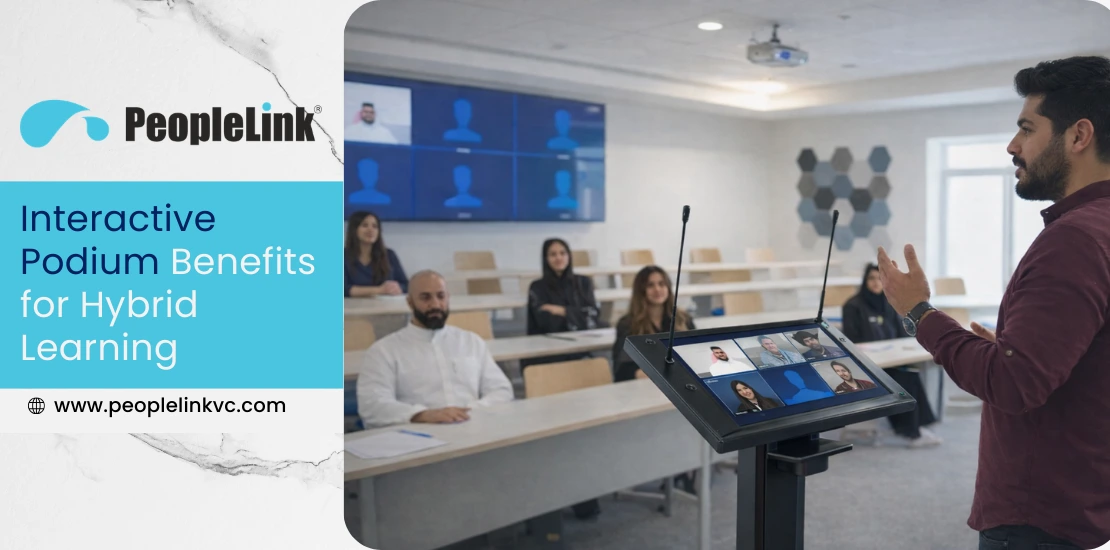
The traditional classroom has evolved into something far more dynamic than four walls and a chalkboard. Today, educators and corporate trainers find themselves at a unique crossroads where physical presence meets digital accessibility (the ability to join a class online or in person). This shift toward hybrid learning is no longer a temporary fix but a permanent way of sharing knowledge. However, teaching a group of students sitting in front of you while simultaneously keeping a remote audience engaged is a difficult balancing act. It requires specialized infrastructure that moves as fast as the conversation.
Many instructors face the hurdle of managing multiple devices and tangled cables, which disrupts teaching. Institutions seek a single command center; the interactive podium serves as this vital hub, reducing technical issues and letting the lesson stand out.
What is an Interactive Podium?
An interactive podium is more than just a modern teacher’s desk. It combines computing power, AV controls, and presentation tools in one ergonomic unit—the cockpit of a modern classroom. Unlike a basic lectern, a smart podium creates a unified digital ecosystem.
These systems let information flow naturally. They feature a large, responsive touchscreen that serves as both a monitor and a digital canvas. Integrating a powerful PC directly in the unit eliminates the common issues with external laptops.
Explore the Standard in Modern Teaching: View the PeopleLink Interactive Podium Series for detailed specifications and features.
Core Features of a Modern Podium
- Touch Screen Control Panel: A crisp, pressure-sensitive interface for navigating slides and managing the room.
- Integrated PC: High-speed processing to handle video conferencing and heavy multimedia apps without a hitch.
- Wireless Presentation: Support for BYOD (Bring Your Own Device), allowing students or guest speakers to mirror their screens instantly. BYOD means allowing users to connect their personal devices, like laptops, tablets, or smartphones, to the system.
- Built-in Audio System: Professional-grade microphones and mixers that ensure remote learners hear every word clearly.
- Document Camera Compatibility: Easy integration for showing physical textbooks, science experiments, or 3D models in real time.
- Classroom Control Interface: One touch commands to lower the lights, drop the projector screen, or wake up the displays.
Interactive Podium Benefits for Hybrid Learning
When we look at how technology impacts the classroom, the goal is always to make the experience feel “invisible” so the learning can be visible. The following interactive podium benefits for hybrid learning demonstrate why this hardware is becoming a staple in modern institutions.
1. Seamless Hybrid Teaching
The biggest benefit for instructors is the ability to manage both audiences seamlessly. A smart podium enables viewing remote students on a single screen while engaging with the physical class, keeping all participants involved.
2. Improved Student Engagement
Use touch screens to annotate slides, highlight data, and open digital whiteboards instantly. This hands-on approach keeps students engaged and content memorable.
3. Centralized AV Control
Control all classroom AV functions from one podium. Adjust volume, camera angles, and inputs instantly for a smoother teaching flow.
4. Wireless Presentation
Modern classroom technology enables wireless sharing, supporting collaboration. Students can share work from their devices directly to the main screen, building community between in-person and remote peers.
5. Reduced Technical Complexity
No more wondering about audio or which cable is needed. The podium’s plug-and-play design eliminates messy wiring and multiple adapters, giving teachers confidence to begin lessons promptly.
Watch: PeopleLink Interactive Podium in Action See how integrated AV control and digital annotation come together to simplify the teaching experience: PeopleLink Interactive Podium | Video Overview
What makes the PeopleLink Interactive Podium the modern classroom standard?
- How does it enhance writing? The 27 inch 4K touch monitor provides a fluid digital canvas for real time annotation that syncs instantly with all viewers.
- Can it adapt to different users? Yes, the electric lifting system adjusts the height for perfect ergonomics at the touch of a button.
- Is room control complicated? Not at all; the interface centralizes everything from source switching to audio management into one interface.
- Will remote students hear clearly? Dual gooseneck microphones combined with integrated audio processing ensures studio quality sound for every participant.
How Interactive Podiums Enable Hybrid Classrooms
A successful hybrid classroom depends on tech integration. The podium bridges the gap between physical tools and digital meeting spaces.
Because these units are built with video conferencing compatibility in mind, they integrate natively with platforms like Zoom and Teams. When you annotate a document on the podium screen, those digital marks are sent instantly to the remote students’ screens. It creates a unified digital learning environment where everyone, regardless of location, sees the same “live” content.
Industry Use Cases
Smart Classrooms
From K-12 to higher education, schools are using these podiums to power “HyFlex” models. HyFlex (Hybrid-Flexible) refers to courses that allow students to participate in person or remotely, offering flexible attendance. This allows for a flexible attendance policy in which the lecture quality remains identical for those at home and those in the front row.
Corporate Training Rooms
In the business world, remote collaboration is the new standard. Global companies use digital teaching solutions to train employees across continents, ensuring that the corporate culture and training standards remain consistent.
Government and Public Sector
Smart campus initiatives often rely on these podiums to modernize training for civil servants and public educators, providing a professional setup that matches the scale of government projects.
Advantages of the Integrated Approach
Choosing an all-in-one solution provides several distinct advantages:
- Higher Retention: Interactive tools improve student engagement and learning outcomes.
- Professional Image: A sleek, organized podium creates a professional classroom setup that reflects the institution’s commitment to quality.
- Future-Ready: These systems are built as future-ready digital infrastructure, allowing for software updates that keep the hardware relevant for years.
- IT Efficiency: Standardized hardware across a campus simplifies IT management and reduces emergency support calls.
Cost vs. Long-Term ROI
It is easy to compare the price tag of a professional interactive podium to that of a wooden desk, but the real value lies in the consolidation. When you add up the cost of a high-end PC, a touch monitor, an AV controller, a mixer, and the labor to wire them all together, the podium is often the more cost-effective choice.
Beyond the initial purchase, you see the ROI in reduced downtime and lower maintenance costs. Because the system is purpose-built for 24/7 educational use, it has a much longer lifespan than consumer electronics.
Buying Guide: What to Look For
Before making the transition, IT heads and facility managers should evaluate:
- Ease of Use: Is the interface intuitive enough for a guest speaker to use without a 30-minute orientation?
- Connectivity: Does it have enough ports for your existing audio system and external cameras?
- Durability: Is the build quality high enough to withstand daily use in a busy university environment?
- Vendor Reliability: Does the manufacturer provide local support and a solid warranty? PeopleLink, for instance, is known for its consultative approach to AV integration.
Conclusion
The future of education is hybrid, and the tools we use must reflect that reality. An interactive podium is more than just a piece of furniture; it is the key to unlocking a more inclusive and efficient way of teaching. By simplifying the tech, we give educators the power to do what they do best: inspire their students.
As institutions look to modernize, moving toward integrated classroom technology is the most logical step for long-term growth. PeopleLink interactive podium solutions provide the reliability and innovation needed to turn any room into a world-class learning environment.
Frequently Asked Questions
What is an interactive podium?
It is a centralized digital lectern that combines a computer, a touchscreen, and AV control tools to help teachers manage presentations and hybrid classes from a single location.
How does an interactive podium support hybrid learning?
It syncs what is happening in the physical room with what remote students see, allowing for real-time interaction and clear communication across both channels.
Are interactive podiums suitable for universities?
Yes, they are particularly effective in large lecture halls where managing multiple displays and high-quality audio is critical for student success.
What features should a hybrid classroom podium include?
Look for a responsive touch interface, built-in PC power, video conferencing compatibility, and the ability to share content wirelessly.
Is an interactive podium worth the investment?
Definitely. It simplifies the teaching experience, reduces the need for extra gear, and creates a much more engaging environment for students.