
How to Choose a Digital Podium for Classrooms: The Ultimate Buyer’s Guide
- February 12, 2026
- Posted by: Abhishek Pratap Singh
- Category: Blogs
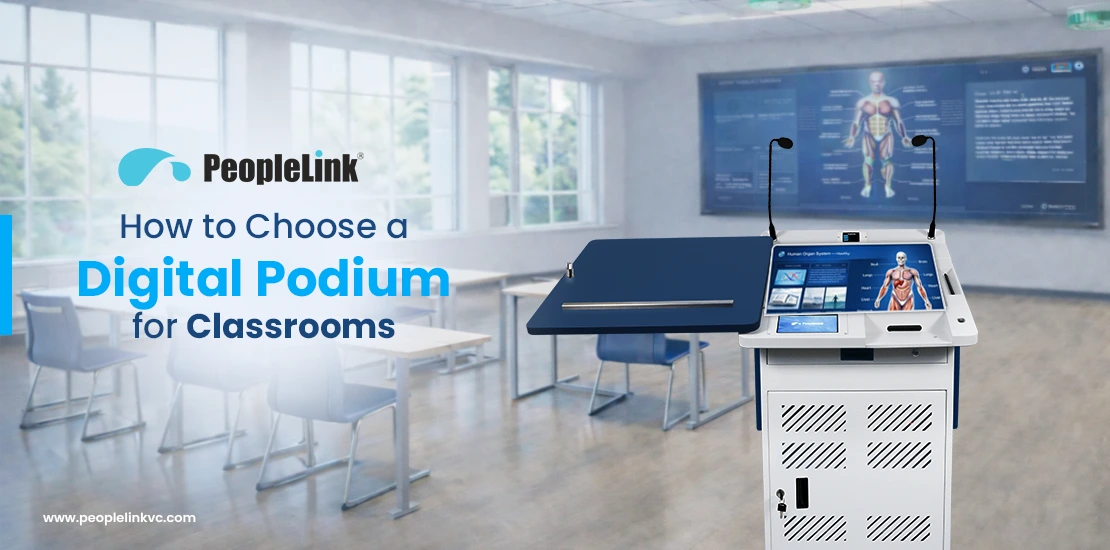
A digital podium for classrooms is an all-in-one interactive lectern that integrates a high-performance computer, a touch-screen display, professional audio, and centralized AV controllers. It allows educators to manage multimedia content, perform real-time slide annotations, and control classroom hardware from a single, ergonomic station, effectively bridging the gap between physical and digital learning environments. By consolidating complex cables and disparate devices into one secure unit, a digital podium empowers teachers to focus on student engagement rather than technical troubleshooting.
Why Digital Podiums are the Backbone of 2026 Education
As schools and universities move toward hybrid learning models, traditional lecterns are being replaced by interactive command centers. The digital podium has become the “nerve center” of the modern classroom, ensuring that technology serves the educator rather than complicating the lesson flow.
For procurement teams and IT heads, the goal is to find a solution that offers:
- Teaching Efficiency: Zero delays in switching between digital resources like 3D simulations and 4K videos.
- Hybrid Readiness: Native support for video conferencing and lecture recording.
- Resource Protection: A secure, lockable housing for expensive AV assets, reducing the risk of theft or damage.
Advanced Features to Look for in 2026
Modern podiums, such as the PeopleLink Signage Podium, have evolved into sophisticated command centers. To future-proof your investment, ensure your choice includes these high-end specifications:
1. 21.5″ Monitor with Hydraulic Lift Function
The primary interface must be versatile. A 21.5-inch touch screen provides the canvas needed for complex software, while the inclusion of a Hydraulic Lift Function is a game changer for ergonomics. This allows instructors to adjust the monitor angle effortlessly, ensuring comfort whether they are sitting or standing during long lecture sessions.
2. HDMI Splitter and Multimedia Controller
To manage diverse content sources, a professional podium must include an integrated HDMI Splitter and Multimedia Controller. This allows the educator to:
- Simultaneously Display Content: Send the same high-definition signal to both the podium monitor and multiple external displays or projectors.
- Centralize Media Switching: Toggle between the internal PC, a guest laptop, or a document camera without manually swapping cables.
- Maintain Signal Integrity: Ensure 4K or 1080p video quality is preserved across long cable runs to wall-mounted displays.
3. Comprehensive Multi-Microphone Suite
Audio clarity is the most critical factor for student retention. A premium podium should include:
- Gooseneck Microphone: Ideal for formal, stationary lecturing from the podium.
- Collar Microphone: Provides hands-free mobility for teachers who like to move around the room.
- Headband Microphone: Ensures consistent audio levels even as the instructor turns their head to interact with students.
4. External Device Control via 7″ Touch Screen
Modern podiums feature a secondary 7-inch Touch Screen specifically designed to control external devices. This allows the teacher to power on projectors, lower motorized screens, and adjust classroom lighting or volume without navigating through complex PC menus.
How to Choose a Digital Podium for Classrooms
Choosing the right digital podium requires a strategic balance between pedagogical needs and technical integration. By following this structured process, educational leaders can ensure a high-ROI investment:
1. Define Your Classroom Use Case
- Hybrid Readiness: Identify if the podium must support remote students via platforms like Zoom or Microsoft Teams.
- Teacher Mobility: Decide if the educator requires hands-free mobility via wireless collar or headband microphones.
- Device Variety: Audit the types of devices used, such as guest laptops or physical visualizers.
2. Prioritize Ergonomics and Interface
- Touch Monitor: Select a minimum 21.5″ touch screen for detailed software interaction.
- Hydraulic Lift: Ensure the unit features a hydraulic monitor lift to allow comfortable viewing angles for different heights.
- Secondary Control: Look for a secondary 7-inch touch panel to manage room hardware (projectors, screens, volume) without navigating the main menus.
3. Evaluate AV Routing and Connectivity
- Integrated Multimedia Controller: Ensure the system can switch between internal and external sources instantly without manual cable swapping.
- HDMI Splitting: Verify the inclusion of an HDMI splitter to send signals to the podium simultaneously and external displays.
- Audio Intelligence: Prioritize systems with built-in Digital Signal Processing (DSP) for crystal-clear sound.
4. Conduct a Technical Readiness Audit
- Power & Data: Provide stable power points with UPS backup and dedicated LAN drops.
- Cable Management: Design concealed floor conduits for a clutter-free environment.
- Speaker Compatibility: Ensure classroom speakers match the podium’s built-in amplifier output.
5. Assess Long-Term Support and ROI
- Global Support: Research the brand’s reputation for international service and comprehensive warranty coverage.
- Total Cost of Ownership (TCO): Consider upgrade paths and software updates that reduce future costs.
- Industry Standards: Aligning with EdTech research insights ensures your hardware supports the digital transformation of global education.
Key Benefits of Using a Digital Podium in Classrooms
Implementing an interactive teaching podium offers transformative advantages for both educators and students:
- Enhanced Teaching Efficiency: Educators can switch between presentations, 3D simulations, and 4K videos with a single touch, eliminating the “tech setup” delays common in traditional setups.
- Increased Student Engagement: Real-time annotation features allow teachers to highlight key concepts directly on the screen, maintaining focus and improving information retention.
- Seamless Hybrid Learning: Modern podiums act as the “brain” for hybrid environments, routing high-quality audio and video to both in-class displays and remote students simultaneously.
- Centralized Asset Security: Lockable metallic bodies and safety locks protect expensive internal hardware such as PCs and DSPs from unauthorized access or theft.
- Ergonomic Comfort: Features like hydraulic lifts reduce physical strain on teachers, allowing them to maintain an optimal posture throughout long lecturing hours.
Support and Budget: Maximizing Your ROI
When finalising your procurement, the “Support and Budget” phase is where long-term success is determined. Use the following criteria to evaluate your choices:
- Warranty and Support: Research the vendor’s reputation for reliability, after-sales support, and warranty coverage to minimize downtime and maintenance issues. In the Indian market, look for brands that offer on-site support and have a verified track record with educational institutions.
- Cost vs. Value: Balance the initial investment with the long-term benefits and total cost of ownership (TCO). Consider potential upgrade paths, software updates, and any licensing fees. While entry-level units save money today, a modular system may save lakhs in future upgrades.
- Trial Period: Whenever possible, arrange for a demonstration or trial period to ensure the podium meets the specific needs of the faculty and integrates seamlessly into the teaching environment. Testing compatibility with your existing interactive flat panels is crucial.
Technical Readiness: Installation Requirements
Before your podium arrives, ensure your IT team has prepared the following:
- Power Connectivity: A stable 5A/15A power point near the podium location with UPS backup.
- Network Access: A dedicated LAN drop for high-speed internet and remote IT management.
- Cable Pathways: Concealed floor conduits for HDMI/VGA cables running to the projector or wall-mounted displays to maintain a clutter-free look.
- Acoustics: If using the built-in amplifier, ensure the classroom speakers are compatible with the podium’s output (typically 8-ohm or 70V/100V lines).
Essential Features Checklist for Procurement
When vetting vendors, ensure the hardware meets these criteria for snippet-ready eligibility:
- Metallic Body: CRCA steel construction for maximum durability.
- German-Made Telescopic Slides: Ensures the sliding top mechanism lasts for years.
- Integrated PC: High-performance internal CPU (Intel i5/i7) for 4K rendering.
- Document Camera Support: A dedicated sliding tray for visualizers.
- Security: Centralized locking system for all doors, drawers, and the monitor.
- Cooling: Silent industrial-grade fans for thermal management.
Why PeopleLink is a Trusted Global Partner
As a leading OEM in the AV space, PeopleLink has designed its solutions specifically for the unique challenges of the Indian education sector ranging from dust protection to voltage stability.
- All-in-One Advantage: Their podiums integrate the PC, Touch Monitor, Audio System, and Controller into a single, sleek metallic chassis.
- Seamless Ecosystem: PeopleLink podiums work natively with their 4K AI Tracking Cameras and Smart Classroom Solutions, providing a unified user experience.
- Local Support: With headquarters in Hyderabad and a nationwide service network, they provide the rapid response time that schools and universities require.
- Industry Standards: By aligning with EdTech research insights, our hardware supports the evolving digital transformation of global education.
Conclusion
Choosing the right digital podium for classrooms is about more than just hardware; it is an investment in your institution’s pedagogical future. By focusing on integration, a realistic budget, and a robust support partner, you ensure that technology serves the educator, not the other way around.
Ready to see a PeopleLink e-Podium in action? Contact Our Experts Today for a customized quote and a detailed AV site survey of your campus.
What is a digital podium used for in classrooms?
A digital podium centralizes all teaching tools. It allows teachers to control the PC, projector, and audio system from one place while using a touch screen to annotate slides, play videos, and manage the classroom without losing eye contact with students.
What features should a smart classroom podium have?
A high-quality smart podium should have a 21.5″ or 27″ interactive touch monitor, a built-in high-performance PC, integrated audio (gooseneck and wireless mics), multiple connectivity ports (HDMI/USB-C), and a secure locking system
Is a digital podium suitable for hybrid learning?
Absolutely. Digital podiums act as the bridge for hybrid learning by connecting classroom cameras and microphones to platforms like Zoom, Google Meet, or Microsoft Teams, allowing teachers to engage both physical and remote students simultaneously.
Can I use my own laptop with a digital podium?
Yes. Professional podiums include integrated multimedia controllers and HDMI splitters specifically designed to allow educators to seamlessly plug in and switch to their guest laptops without interrupting the lesson flow.
How does a digital podium help with classroom management?
It keeps the teacher facing the students rather than turning back to write on a traditional board. By controlling all classroom technology from one ergonomic station, teachers can maintain better eye contact and engagement, leading to improved discipline and focus.
Are digital podiums compatible with existing interactive flat panels?
Yes. When choosing a podium, compatibility with existing interactive flat panels is a key consideration. High-quality units are designed to work natively within a unified smart classroom ecosystem.