

Why Your 2024 Video Setup Won’t Cut It in 2026: A Hybrid Reality Check
- January 16, 2026
- Posted by: Damanjeet Kaur
- Category: Blogs
Let’s be honest: most of us have been managing with outdated office tech for far too long. You know the scene. People in the conference room look like tiny, indistinct figures at the far end of a long table, and the remote team is guessing who’s talking. Or worse, the “all-in-one” mic is struggling so hard to pick up sound that the whole meeting feels like a low-quality long-distance call.
In 2026, the best video conferencing systems for hybrid work are no longer defined by just “having a camera.” They are defined by meeting equity the idea that a remote participant should have the exact same visual and auditory “presence” as the executive sitting in the room. If the technology isn’t bridging that gap, it’s getting in the way. According to our latest guide on designing hybrid meeting rooms, shifting from disconnected to engaged requires an intentional AI upgrade.
By 2026, just “getting through” a meeting isn’t enough. IT and HR leaders are finally seeing that poor audio and grainy video are significant barriers to productivity. Modern systems must bridge the gap between physical and digital spaces seamlessly. This guide explores how AI-driven AV hardware is setting the new standard for professional collaboration.
Factors to Consider for the Best Video Conferencing Systems for Hybrid Work
Buying AV gear today isn’t like a quick trip to an electronics store. It’s about how that equipment survives the daily grind of a busy office. Here is what you should actually be asking before you commit your budget:
1. The Room’s “Acoustic Personality”
A glass-walled room might look sleek, but it usually sounds like a fishbowl. High ceilings? That’s just an echo chamber. You need to know if your specific space requires beamforming ceiling mics or heavy-duty digital signal processing (DSP) to make voices sound like they’re coming from a human, not a robot. In 2026, “decent” audio is a fast track to meeting fatigue. If you can’t hear the fine details in a person’s tone, you’re missing important context.
2. The “One-Touch” Join Rule
Tech adoption fails the moment the interface becomes difficult. If your team is delayed by complex remote controls or faulty cables every single Monday morning, your system has failed.. You want a touch controller on the table where one tap starts the meeting. That’s it. No manual required. For more on how to simplify these workflows, see our comprehensive guide to the future of work.
3. Platform Freedom (BYOM)
Your office might live on Microsoft Teams, but your biggest client probably uses Zoom or Webex. Your rooms have to support Bring Your Own Meeting (BYOM). This lets anyone walk in, plug in one USB-C cable, and utilize the room’s professional mics and cameras for whatever platform they’re using. In 2026, flexibility is a requirement, not a feature.
4. The Single-Brand Advantage
Trying to integrate several different brands in one room is a major challenge for IT support. Staying within a unified ecosystem like PeopleLink ensures the camera, the mic, and the software actually “talk” to each other. It makes troubleshooting a breeze and ensures a firmware update on one device doesn’t break the entire room.
Must-Have Features of the Best Video Conferencing Systems for Hybrid Work
If you are looking at the current market, these three features are essential for a professional setup:
- AI Tracking that Actually Works: Seeing the room is easy; seeing the people is the hard part. PeopleLink’s AI Speaker Tracking doesn’t just pan around blindly. It intelligently zooms in on whoever is talking. Meanwhile, Auto-Framing keeps the shot tight even when someone starts pacing or leaning back to think.
- 3A Audio (The Secret Sauce): You need Adaptive Echo Cancellation (AEC), Automatic Gain Control (AGC), and Noise Suppression (ANS). Basically, the technology should eliminate background noise like someone opening a snack or the hum of the ventilation while keeping the speaker’s voice crystal clear.
- Real Optical Zoom: Digital zoom is ineffective in large boardrooms because the image becomes distorted and blurry. For a 20-foot table, you need Optical Zoom (12x to 30x) to see facial expressions in true 4K. If you can’t see the person’s eyes, you’re missing half the communication.
A Day in the Life: The IT Manager’s Perspective
Imagine it’s 8:55 AM on a Monday. In the old days, this was when the “emergency” tickets would start flying in. “The mic is dead in Room 4,” or “The camera won’t wake up.”
In 2026, an IT manager using a PeopleLink Enterprise Solution has a much quieter morning. They open one cloud dashboard and see that all 50 rooms across three global offices are “Green.” They can see the firmware updated itself at 2 AM. They can even see that Room 12 is currently overcrowded based on the camera’s occupancy sensors. This shift from “putting out fires” to “proactive management” is the real ROI of high-end conferencing.
PeopleLink Standardized Room Bundles
We have taken the guesswork out of the gear by creating bundles that are guaranteed to play nice together.
The HR3 Bundle (Huddle Rooms: 3–6 People)
- The Gear: PeopleLink i20 Plus Videobar + 55″ Interactive Display + Touch Controller.
- The Setup: This is your “grab-and-go” solution. A 4K bar that handles everything in one shot. Perfect for those quick 15-minute syncs where you just need to plug in and get moving.
The MR2 & MR4 Bundles (Medium Rooms: 10–18 People)
- MR2 Setup: iCam FHD 10x + Quad Speakerphone 12 + 75″ Display.
- MR4 Setup: Speaker Track Camera + CM Alpha (Ceiling Mic) + Speakerbar.
- The Setup: The MR4 is for people who hate cable clutter. By putting the mic in the ceiling (the CM Alpha), you get total voice coverage with a 100% clean table. It looks sleek and sounds even better.
The LC1 Bundle (Large Boardrooms: 24–40 People)
- The Gear: Interactive Display + Elite XL Series 20x + Wireless Digital Conference System + AIO DSP.
- The Setup: This is for the high-stakes executive calls. Every participant gets a dedicated mic, and when they speak, the 20x zoom camera finds them instantly. No more “Who just said that?” from the remote team.
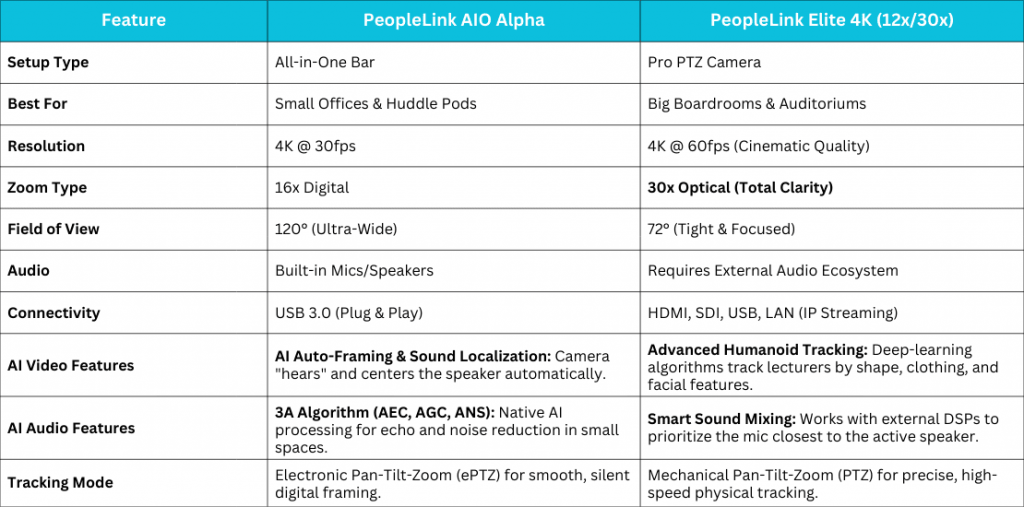
Deep Dive: Which One Fits Your Needs?
PeopleLink AIO Alpha: The “Agile” Choice
The AIO Alpha is designed for efficiency. By housing the camera, microphones, and speakers in a single integrated unit, it removes the cable clutter that often complicates small rooms.
- The AI Edge: It uses Sound Localization. The camera literally “hears” where you are and puts you in the center of the frame automatically.
PeopleLink Elite Series: The “Power” Choice
The Elite Series is for spaces where you can’t afford to miss a single detail. In a 20-foot boardroom, digital zoom makes everyone look like a collection of pixels. The Elite uses physical glass lenses to keep the image sharp.
- The Precision Edge: With 4K @ 60fps, motion looks fluid and real. When paired with PeopleLink Quad Speakerphones, you create a bubble of sound that makes remote participants feel like they are actually in the room.
Beyond Video: The Sustainability Factor
In 2026, the best conferencing systems are also CSR tools. By investing in “life-like” video, companies are successfully cutting executive travel by nearly 40%. Recent studies from Global Workplace Analytics show that high-end AV is a green initiative that pays for itself in saved airfare alone.
The 2026 Buyer’s Checklist
- Does it give every person their own “tile” on the screen?
- Can IT manage and reboot it remotely via the cloud?
- Does it work with Teams, Zoom, and Webex without an adapter?
- Does it track occupancy data for office planning?
- Is the audio “3A” certified?
Conclusion:
In 2026, your video setup isn’t just an “IT cost”, it’s how your company actually communicates. It’s the difference between a team that really collaborates and one that just coordinates. When technology becomes invisible, people stop worrying about the screen and start focusing on the work that actually matters.
Ready to stop “making do” and start collaborating? Our team at PeopleLink doesn’t just sell boxes; we design spaces that actually work for hybrid teams.
[Book a Free Demo with a PeopleLink Expert Today]
FAQs
Can we use PeopleLink hardware if we switch from Zoom to Teams next year?
Absolutely. Whether you use Native Room kits or BYOM laptop connections, the hardware will keep working regardless of your software choice.
Does the Ceiling Mic pick up hallway noise?
No. The CM Alpha uses beamforming. It creates a “pick-up zone” at the table and ignores everything outside of it, like a door opening or people talking in the hall.
Is 4K overkill for a basic meeting?
It’s not about the pixels; it’s about the micro-expressions. 4K lets remote callers see body language and facial cues that get lost in 1080p. In a negotiation, those details are everything.