

Why a Digital Podium Is Essential for Modern Conferences and Events
- March 20, 2026
- Posted by: Abhishek Pratap Singh
- Categories: AV-Tech, Blogs
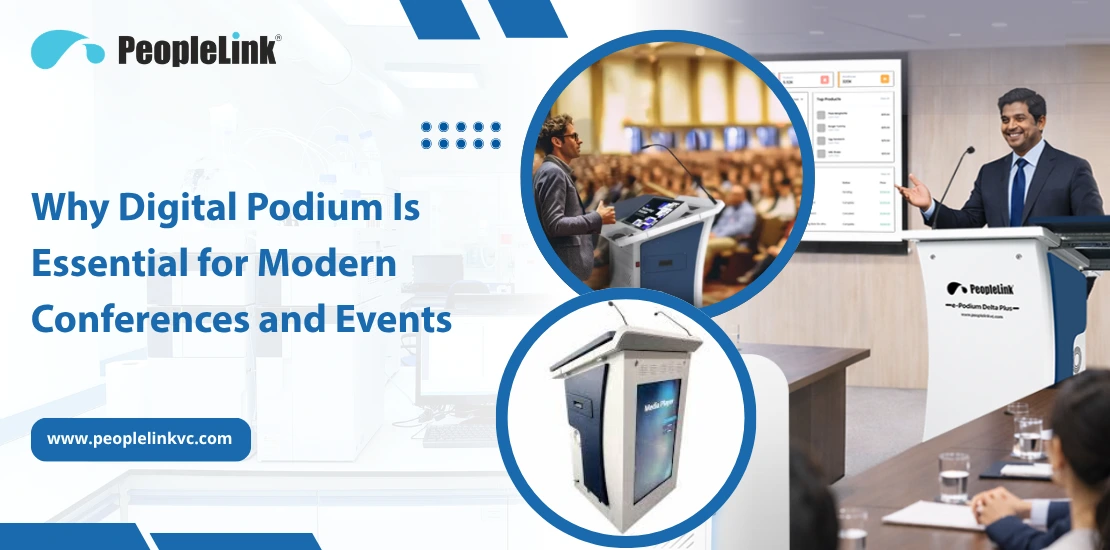
Quick answer: A digital podium is an all-in-one lectern that combines a touchscreen, microphone, controls, and connectivity so a presenter can run a lecture or briefing from one station. It matters because it replaces scattered AV gear with a single managed unit. PeopleLink builds interactive and signage podiums that integrate with its cameras, audio, and room software.
Today, organizations expect communication that engages, not just slide shows. As 2026 approaches, the traditional lectern-once a sign of authority-now restricts us. Tangled wires, outdated adapters, and static presentations do more than inconvenience; they blunt your brand and distance your audience. With hybrid events now standard, many leaders prefer digital podiums. These all-in-one systems change how speakers connect with content and audience, elevating auditoriums and boardrooms.
Equipping a lecture hall or auditorium? See PeopleLink’s digital podium range.
What Is a Digital Podium?
A digital podium, or smart lectern, merges audiovisual hardware and computing in a modern, easy-to-use design. It is a control center for presentations, letting speakers manage everything-slides, notes, lighting, sound-from one place. The Anatomy of a Smart Podium in 2026
- Interactive Touch Display: A high-fidelity screen (often 21″ to 27″) that supports multi-touch and digital ink.
- Integrated High-Performance PC: No need to bring your laptop.
- Professional Audio Suite: Built-in gooseneck microphones with AI-driven noise cancellation.
- Universal Connectivity: Connect easily with HDMI, USB-C, and wireless options like AirPlay, Miracast, and Google Cast.
Explore the Standard in Modern Teaching: View the PeopleLink Interactive Podium Series for detailed specifications and features.
Why Traditional Lecterns Fall Short in 2026
If your speakers still struggle with old adapters or stand behind a fixed lectern, your event may not be as effective as it could be.
- Zero Interactivity: Traditional stands force the presenter to look down at a laptop or turn their back to the audience to point at a projection screen.
- Setup Complexity: Manual configurations lead to “technical difficulties” that eat into valuable event time.
- Cable Management: Exposed wires look messy and make your brand seem less innovative.
- Lack of Hybrid Support: Old-fashioned lecterns offer no native way to interact with remote participants via all major video conferencing platforms.
Key Benefits of a Digital Podium
1. Seamless, Plug-and-Play Presentations
A digital podium saves setup time. Presenters load files via USB, cloud storage, or USB-C. The system auto-adjusts room display settings.
2. Enhanced Audience Engagement
Digital podiums make presentations more interactive. With digital ink, speakers can highlight trends on a graph or write down ideas as they come up. This approach keeps the audience focused and helps them remember the information.
3. All-in-One Professionalism
A modern podium, such as those from PeopleLink, hides all the technology inside. This creates a clean, simple stage that puts the focus on the speaker instead of the equipment. It also makes your facility look more professional.
Key Features to Look for in 2026
In 2026, digital podiums function as smart control centers. Leaders should seek features that go beyond basics to support AI and hybrid events.
1. AI-Powered Presentation Assistance
The most significant shift in 2026 is the integration of Edge AI. Modern podiums now feature:
- Live Transcription & Translation: Real-time captioning on the podium screen to support global audiences or hearing-impaired participants.
- Gesture Control: Advanced sensors let presenters move through slides or zoom into 3D models without touching the screen. This helps them keep a natural stage presence.
- Automated Lecture Capture: AI-driven tracking that syncs podium content with room cameras for remote viewers.
2. Hybrid-Ready Ecosystem Integration
In 2026, a podium is only as effective as its connectivity. Look for:
- 4K Wireless Casting: Presenters should be able to share content from any device without needing physical dongles.
- Native UC Integration: Deep, one-touch integration with platforms like all major video conferencing platforms directly from the podium’s interface.
3. Sustainability & Energy Intelligence
With corporate ESG goals at the forefront, 2026 models prioritize:
- Presence-Based Power Management: Smart sensors turn on the podium when a presenter arrives and put it into sleep mode when the room is empty.
- Modular Hardware: The ability to upgrade the internal PC without replacing the entire unit, extending the product’s lifecycle.
4. Advanced “Digital Ink”
Now, writing on a digital podium feels just like writing on paper. Top models use Zero-Bonding Displays, which remove the space between the glass and the screen for precise, real-time annotations.
How PeopleLink Digital Podiums Stand Out
PeopleLink leads the way in designing AV solutions that focus on the user. Our podiums are more than just furniture-they are tools that help you work better.
- Intuitive Interface: Our podiums are easy to use, so even first-time users can feel like a pro within 30 seconds.
- Premium Audio Clarity: Our built-in microphones use advanced technology to prevent feedback, even in large or echoing rooms.
- Industrial Build Quality: Made from strong materials that stand up to heavy use in schools and government buildings.
- Custom Branding: PeopleLink can customize podiums to match your company’s brand and style.
Digital Podium vs. Traditional Lectern
| Feature | PeopleLink Digital Podium | Traditional Lectern |
|---|---|---|
| Tech Integration | All-in-one (PC, Touch, Audio) | None (furniture only) |
| Setup Time | Under 10 seconds | 5 to 15 minutes |
| Interactivity | Live Touch & AI Gestures | Static / Laser Pointer |
| Hybrid Support | Built-in Camera & UC sync | Requires external kits |
| Cable Management | Fully Internal | Messy / exposed |
| Future-Proofing | AI & Cloud Ready | Obsolete |
Use Cases for High-Impact Delivery
1. Corporate Boardrooms & Executive Briefings
In business, time is valuable. Here, the focus is on being professional and efficient.
- The Strategy: High-level executives need to switch between global sales data, live market feeds, and video calls without a second of downtime.
- The Tech: The digital podium lets the presenter control everything in the room, including lighting, sound, and content, from one place. This helps your brand appear as modern as your data.
2. Higher Education & Modern Classrooms
Education in 2026 is interactive and focused on how Gen Alpha learns best.
- The Strategy: Keeping students engaged requires active participation and multimedia integration.
- Professors use the touch display to write in digital textbooks or display 3D models in real time. Lecture Capture ensures remote students see exactly what is shown in the room.
3. Government & Command Centers
When the task is important, there can be no technical problems. Here, security and reliability are most important.
- The Strategy: Government briefings often involve sensitive data and multiple stakeholders.
- The Tech: PeopleLink podiums offer secure, wired connections and let you switch between secure feeds quickly. Their strong build means the controls stay reliable, even in stressful situations.
4. Professional Training & Workshops
Training works best when people can participate, not just watch. This example shows the value of hands-on demonstrations.
- The Strategy: An instructor needs to show complex software workflows or technical diagrams while still facing the trainees.
- The Tech: With features like Screen Mirroring and Digital Ink, trainers can point out lines of code or parts of a diagram right on the screen. This makes it easier for trainees to follow along and remember what they learn.
Future of Conference Technology: Beyond 2026
The future is clear: podiums are smart interfaces between people and technology. Soon, a podium will recognize the speaker, load presentations from the cloud, adjust the microphone, and set room climate and lighting before the speaker even begins.
Ready to Transform Your Presentations?
Don’t let outdated technology limit your organization’s message. Act now-choosing a PeopleLink Digital Podium is more than an upgrade; it’s your commitment to leading in quality, engagement, and modern communication. Take action and set your stage apart today. Take the step toward a smarter stage and future-ready presentations:
- 👉 Request a Quote, Tailored solutions for your auditorium or boardroom.
- 👉 Explore the Full Range, Discover which PeopleLink model fits your space.
What is a digital podium?
A digital podium is an integrated lectern featuring a touch-screen monitor, built-in computer, and AV controls, designed to streamline presentations and improve interactivity.
How is it different from a standard lectern?
A standard lectern is a static stand. A digital podium is an active technology hub that manages audio, video, and content interactions from a single central point.
Is it difficult to learn how to use?
Not at all. PeopleLink digital podiums are designed for “walk-up-and-use” simplicity, with intuitive touch interfaces similar to those on smartphones.
Can I use my own laptop with a digital podium?
Yes. While they have built-in PCs, they also feature “Plug-and-Play” ports (HDMI/USB-C) and wireless casting for presenters who prefer their own devices.
Is a digital podium worth the investment for a small hall?
Yes. By consolidating the need for separate PCs, switchers, and microphones, a digital podium often reduces the overall cost of outfitting a room with AV gear.

Ready to upgrade your rooms?
See PeopleLink’s AV and Unified Communications solutions in action, or get pricing built around your needs.