

High-Quality Conference Cameras for Boardrooms: Your Digital Handshake
- January 9, 2026
- Posted by: Damanjeet Kaur
- Categories: Blogs, Meeting Rooms

Quick answer: A conferencing camera captures the people and content in a room so remote participants see clearly. The right choice depends on room size: webcams suit personal desks, while PTZ (Pan-Tilt-Zoom) and auto-tracking cameras cover larger rooms. PeopleLink builds a full camera range, from 4K webcams to PTZ and AI tracking cameras, engineered to pair with its own audio and room endpoints.
We’ve all lived through it. You’re halfway into a critical pitch, and the stakeholder on the other end looks like a pixelated ghost from 2005. It’s an immediate drain on the room’s professional energy. In a high-stakes setting, investing in high-quality conference cameras for boardrooms isn’t just a tech upgrade; it’s a direct reflection of your brand’s attention to detail. By 2026, the bar has moved. It’s no longer enough to just “see” people; it’s about meeting equity. You need the director calling in from home to have the same visual weight as the person sitting at the head of the mahogany table. If your camera can’t pick up a subtle nod or a skeptical look from twenty feet away, you aren’t having a meeting; you’re just having a phone call with a bad picture.
Matching a camera to your room? See PeopleLink’s camera and conferencing range and PTZ camera options.
Why Huddle Room Cameras Die in the Boardroom
I see IT teams make this mistake constantly: trying to save a few dollars by putting a small-room camera into a 20-foot boardroom. Here is the “from-the-field” reality of why that fails:
- The Bowling Alley Effect: Without true optical zoom, people at the far end of the table appear distant and indistinct. It’s hard to build trust when faces lack clarity.
- Fighting the Windows: Boardrooms may have great views, but basic camera sensors struggle with backlighting, often leaving the speaker poorly lit and lacking facial detail. The result is a video that hides expressions instead of conveying presence.
- The “Security Cam” Vibe: Staring at a single, wide, unmoving shot for an hour is a recipe for instant brain fog. It doesn’t feel like a discussion; it feels like surveillance.
Key Features of High-Quality Conference Cameras for Boardrooms
Skip the buzzwords. When choosing high-quality conference cameras for boardrooms, these are the specs that genuinely improve how teams work.
4K Glass (The “Digital Safety Net”)
4K isn’t just about a sharper image. It gives you extra pixels to work with. When the camera zooms in on a single speaker, a 4K sensor maintains clarity and detail. A standard HD camera, by contrast, simply enlarges the image, causing faces to lose definition and appear soft and blurred.
AI Tracking That Isn’t Distracting
Running a meeting shouldn’t require technical expertise. Modern AI acts like a silent Running a meeting shouldn’t require technical expertise. The technology should work quietly in the background, allowing participants to focus on the discussion rather than the setup. Modern AI acts like a silent director, widening the shot as more people walk in and smoothly “cutting” to whoever is speaking. If you have to touch a remote during the meeting, the technology has already failed you.
Optical Zoom vs. Digital Zoom
This is where most people get tripped up. Digital zoom is just enlarging a photo on your phone; it gets blurry fast. Optical Zoom (12x to 20x) actually moves the physical lens. It’s the only way to get a clear shot of the person sitting 15 feet away.
Handling “Real World” Light
Look for High Dynamic Range (HDR) support. It balances bright sunlight and indoor lighting, preventing faces near windows from being washed out. The result is natural skin tones and clear visibility, even in challenging, mixed-light environments.
Choosing the Right Gear for Your Floor Plan
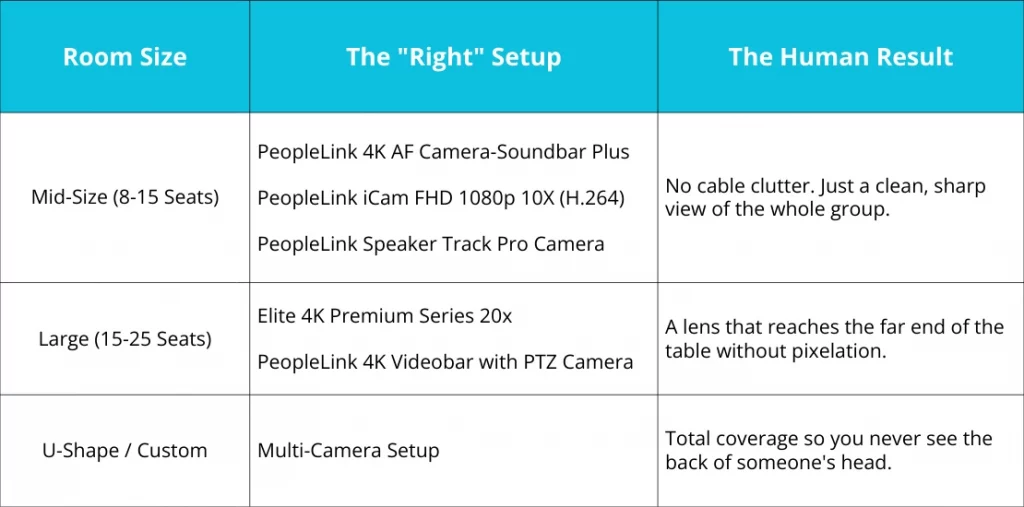
Integration: Making it "Plug-and-Play"
The best camera is useless if it takes twenty minutes to start. We focus on PeopleLink hardware that “just works” with all major video conferencing platforms. By using NDI tech, we run everything over one Ethernet cable. It’s cleaner for the room and much easier for the IT team to manage from their desks.
Conclusion: Lead with Clarity
Your boardroom is your command centre. It’s where the big calls happen. Don’t let sub-par video quality get in the way of a good decision. Want to see the difference for yourself? Let’s skip the slide decks. I can set up a live, remote demo so you can see our 4K optics from the perspective of a remote participant. It’s usually the fastest way to see if the tech fits your vision.
FAQs
Why can't I just use a high-end 4K webcam?
Webcams are made for close-up use. In boardrooms, they lack the zoom needed to clearly capture people seated farther away, making participants look small and unclear.
What is the difference between Auto-Framing and Speaker Tracking?
Auto-framing keeps the whole group in the shot so no one is cut off. Speaker tracking finds the specific person talking and gives them a dedicated close-up. High-end boardrooms need both.
Does my camera choice affect the audio?
Not directly, but practically, yes. Professional cameras are designed to sync with high-end audio systems. If your video is 4K but everyone sounds like they are underwater, the “professionalism” of the meeting still fails.
Is AI tracking distracting?
It shouldn’t be. Older tech “jumped” to speakers, but PeopleLink’s 2026 AI uses smooth, cinematic transitions that mimic a human camera operator.
How do I handle bright windows?
You need a camera with WDR (Wide Dynamic Range). This feature balances the bright window light and the room’s shadows at the same time, keeping faces clear.

| Camera choice by room | Webcam | PTZ / auto-tracking camera |
|---|---|---|
| Best for | Desks and small huddle spaces | Medium to large meeting rooms |
| Lens | Fixed wide angle | Optical zoom with pan and tilt |
| Speaker framing | Manual | Automatic tracking available |
| Detail at distance | Limited | Clear across the full room |
Ready to upgrade your rooms?
See PeopleLink’s AV and Unified Communications solutions in action, or get pricing built around your needs.